Part 3:起步
Part 2 是地基。Part 3 是盖楼:把 WooCommerce 跑起来。 读完 Part 3,你能独立配好一个能收钱的商城。
§26 安装与状态解读
先给结论:装完 WC 第一件事,是看 Status 页。 它比任何文档都先告诉你"哪里不对"。
WooCommerce 状态(Status)解读
后台:WooCommerce → Status
- WordPress environment:WP 环境变量
- Server environment:服务器环境变量
- Database:数据库相关
- Post Type Counts:各文章类型总数
- Security:安全相关
- Active plugins / Inactive plugins:激活/未激活插件
- Settings:设置
- WooCommerce pages:WC 页面配置
- Theme:当前主题
- Admin:管理员功能
- Action Scheduler:操作调度
固定链接设置
后台:设置 → 固定链接
装完 WC 后,这里会多出产品相关选项:
- 分类前缀 / 标签前缀
- Product category base / Product tag base / Product attribute base
- Product permalinks:Default / Shop base / Shop base with category / Custom base
常规设置
后台:WooCommerce → 设置 → General
| 设置项 | 含义 |
|---|---|
| Selling location(s) | 销售到所有国家 / 除某些国家 / 指定国家 |
| Shipping location(s) | 可配送范围 |
| Default customer location | 默认顾客位置(可 Geolocate 按 IP 定位) |
| Enable taxes | 启用纳税(开启后多一个税 tab) |
| Enable coupons | 启用优惠券 |
| Currency options | 货币、货币位置、千分位、小数位、小数位数 |
§27 商店基础设置
先给结论:支付、配送、库存、邮件,四块配齐就能营业。 逐块过,别跳。
产品常规设置
WooCommerce → 设置 → 产品
- 尺寸:Weight unit(重量单位)、Dimensions unit(尺寸单位)
- 评论:Enable reviews(开启产品评论)、显示"已验证"标签、仅已验证用户可评价
产品库存设置
WooCommerce → 设置 → 产品 → Inventory
- Manage stock:开启库存管理
- Hold stock (minutes):未付订单保留 x 分钟,超时取消
- 通知:低库存通知(关联 Low stock threshold)、售罄通知(关联 Out of stock threshold)
- Stock display format:库存显示格式
标叔的结论: | 设置 | 新手常错 | 我的建议 | |------|----------|----------| | Hold stock | 留空以为"无限" | 设 60 分钟,防占库存不付 | | Low stock threshold | 用默认 0 | 设 5~10,提前补货 | | Out of stock visibility | 不隐藏 | 勾选隐藏,体验更干净 |
配送区域与方式
WooCommerce → 设置 → 配送 → 配送区域 → 添加配送区域
- Zone name / Zone regions:名称与地区
- Shipping methods:
Flat rate(标准运费)、Local pickup(自取)、Free shipping(免运费)
免运费条件: - 需要免费送货券 - 最小订单金额 - 最小订单金额 或 优惠券 - 最小订单金额 且 优惠券
标准运费公式示例:
10 * [qty] * 0.9        // [qty] 表示产品数量
10 + 2 - 1 * 2 / 2 * [qty]
[fee percent="10" min_fee="20" max_fee="30"]  // 参照购买产品总价
配送选项
WooCommerce → 设置 → 配送 → 配送选项
- 计算:购物车页显示运费计算器、地址输入前隐藏运费
- 配送目的地:默认配送地址 / 默认账单地址 / 强制账单地址
- 调试模式:开发时开启,否则有缓存看不到效果
配送类型(Shipping classes)
解决"部分免运费、部分统一 8 元"的定制需求。
WooCommerce → 设置 → 配送 → 配送类型 → 添加配送类型
再回到 Flat rate → Ship class costs 设置每类费用。
计算方式: - Per class:每个配送类型单独收费 - Per order:只收最贵的那类
注意:若设了
No shipping class cost,它会和 Cost 累加。 这是新手最常踩的"运费翻倍"坑。
结算与账户
WooCommerce → 账户与隐私
- 游客结账:允许无账户下单、允许结算时登录
- 账户创建:允许结算时/我的账户页创建账户、自动生成用户名、发密码设置链接
默认支付网关
WooCommerce → 设置 → 支付
- Direct bank transfer(银行转账)
- Check payments(支票支付)
- Cash on delivery(货到付款)
银行转账可填:账户名、账号、银行名、Sort code、IBAN、BIC/Swift。
账户与邮件
WooCommerce → 设置 → 电子邮件
- 邮件通知:订单保留、已完成等,各自可开关、改主题/标题/正文
- 覆盖模板:把
woocommerce/templates/emails/customer-on-hold-order.php复制到主题目录storefront/woocommerce/emails/ - 发件设置:From 名称、From 地址
- 邮件模板:顶部图、底部文字、基础色、背景色、正文字色
开启 REST API
WooCommerce → 设置 → 高级 → REST API → 添加密钥
用法:
1. Postman 里 Authorization 选 OAuth 1.0;HTTPS 用 Basic Auth
2. 填入 Consumer Key / Consumer Secret
3. GET 请求:https://你的站点/wp-json/wc/v3/products/54/
入门:https://github.com/woocommerce/woocommerce/wiki/Getting-started-with-the-REST-API
Webhook 的作用
让 WC 在某个事件发生时,向指定 URL 发 POST 请求。
WooCommerce → 设置 → Webhooks → 添加
例:创建一张优惠券时,向某 URL 推送通知。
§28 优惠券详解
先给结论:优惠券不是"填个金额"那么简单。 限制条件用好了,能防羊毛党。
折扣类型
Marketing → Coupons(旧版在 WooCommerce → Coupons)
- Fixed cart discount:固定购物车优惠
- Percentage discount:百分比优惠
- Fixed product discount:固定产品优惠(每买一件减指定额)
字段:Coupon amount(金额)、Allow free shipping(允许免运费)、过期时间(YYYY-MM-DD)。
使用限制(Usage restriction) - Minimum spend / Maximum spend:最低/最高花费 - Individual use only:仅限单独使用 - Exclude sale items:不含促销产品 - Products / Exclude products:限定/排除产品 - Product categories / Exclude categories:限定/排除分类 - Allowed emails:限定邮箱
使用次数限制(Usage limits) - Usage limit per coupon:每券次数(可无限) - Limit usage to X items:限 X 个物品减免(优先数量多、价格高的) - Usage limit per user:每用户次数(可无限)
标叔的经验:做活动 coupon,一定要设
Individual use only+Minimum spend。 我曾因没设,被同一人叠了 5 张券,一夜亏掉半个月利润。
§29 订单与订单状态
先给结论:WC 有 7 种订单状态,支付方式决定初始状态。 搞错状态,库存就乱。
7 种订单状态 1. Pending payment(待付款) 2. Processing(正在处理) 3. On hold(保留) 4. Completed(已完成) 5. Cancelled(已取消) 6. Refunded(已退款) 7. Failed(失败订单)
不同支付方式的初始状态
| 支付方式 | 下单后状态 | 库存 |
|---|---|---|
| 银行转账 | Processing | 已分配 |
| 货到付款 | Processing | 已分配 |
| 支票付款 | On hold | 已分配 |
| PayPal | Pending payment | 未分配 |
状态流转要点 - Processing:已付款待发货的中间态,库存已分配。 - 货到付款:下单即 Processing,收货付款同步。 - 线上支付(如 PayPal):支付平台通知 WC 后,Pending → Processing。 - 虚拟产品:支付成功通知后,Pending → Completed。 - Failed:在线支付失败,WC 收到平台通知后设为 Failed。 - Cancelled:管理员后台取消,或顾客在"我的账户"自行取消。 - 取消订单时 WC 不自动补库存,需手动核对。
订单编辑
WooCommerce → Orders → 编辑订单
仅 On hold、Pending payment 状态下能改 Item 和 Shipping。
- 退款:Restock refunded items(恢复库存)、部分/全部退还、退款原因
- 订单操作:发收据、重发新订单通知、重生成下载权限
- 订单通知:Private note(给自己)、Note to customer(给客户)
手工创建订单
顾客线下转账购买时,可手工建单。
WooCommerce → 订单 → 添加订单,或 Report → Export CSV。
状态流转简图:
订单 -> 在线支付 -> 待付款 -> 是否支付成功
                              | 否 -> 失败订单
                              | 是 -> 处理中 -> 已完成/已退款/已取消
订单 -> 货到付款 ------------> 处理中 -> 已完成/已退款/已取消
订单 -> 线下支付 -> 保留 ----> 是否支付
                              | 是 -> 处理中
§30 产品类型与变体
先给结论:选对产品类型,复杂度差十倍。 变体产品是 WC 最强大的地方,也最容易配错。
Products 下的产品类型:
- Simple product(简单产品):单 SKU,无选项。
- Grouped product(成组产品):组合售卖,也可独立选,价格是指定范围。例:盗墓笔记系列。
- External/Affiliate product(外接/关联产品):跳转到第三方购买。
- Variable product(可变产品):尺码、颜色等可选。例:服装。
属性(Attributes)
Products → 属性
- 产品具备的特征参数
- Custom product attribute:自定义属性
- Name / Value(s) / Visible on the product page / Used for variations
- 添加后,在产品详情页 Additional information 出现
产品数据进阶字段 - General:Regular price(常规价)、Sale price(促销价)、Sale price dates - Inventory:SKU、Manage stock、Stock quantity、Allow backorders、Low stock threshold、Stock status(In stock / Out of stock / On backorder)、Sold individually - Advanced:Purchase note、Menu order、Enable reviews
创建变体产品操作指南:https://kinsta.com/blog/woocommerce-variable-product/
§31 核心对象:$product
先给结论:WC 开发绕不开四个全局对象。
$product 是第一个,也是用得最多的。
获取对象与基础数据:
global $product;
print_r($product); // 输出 WC_Product_Simple 等对象

if (have_posts()) {
    while(have_posts()) {
        the_post();
        global $product, $post;
        print_r($product); // WC_Product 对象
        print_r($post);    // WP_Post 对象
    }
}
产品 ID、图片、相册
if (have_posts()) {
    while(have_posts()) {
        the_post();
        global $product, $post;
        // 产品 ID
        $product->get_id();
        get_the_ID();
        $post->ID;
        // 产品主图:shop_thumbnail / shop_single / shop_catalog / full
        the_post_thumbnail('thumbnail');
        // 产品相册
        foreach ($product->get_gallery_image_ids() as $aid) {
            echo wp_get_attachment_image($aid, 'shop_thumbnail');
        }
    }
}
常用数据一把抓
if (have_posts()) {
    while(have_posts()) {
        the_post();
        global $product, $post;
        the_title();                 // 标题
        $product->get_name();
        $product->get_price_html();  // 价格 HTML
        the_excerpt();               // 简介
        $product->get_short_description();
        $product->get_sku();        // 货号
        the_content();               // 正文
        $product->get_description();
        wp_display_product_attributes($product);              // 属性
        wc_get_product_category_list($product->get_id());    // 分类
        wp_get_product_tag_list($product->get_id());         // 标签
        woocommerce_template_single_add_cart();              // 加购按钮
        woocommerce_upsell_display(1, 2);                  // 增销
        woocommerce_related_products(['posts_per_page' => 1, 'columns' => 2, 'orderby' => 'rand']);
    }
}
对象结构参考:https://www.businessbloomer.com/woocommerce-easily-get-product-info-title-sku-desc-product-object/
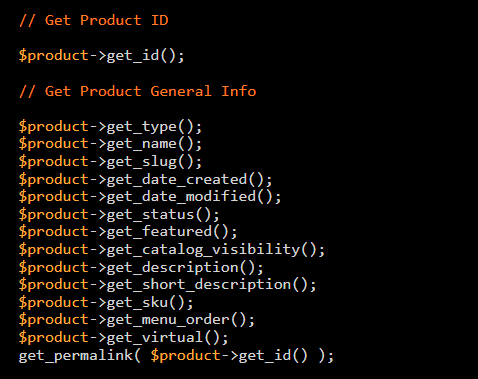
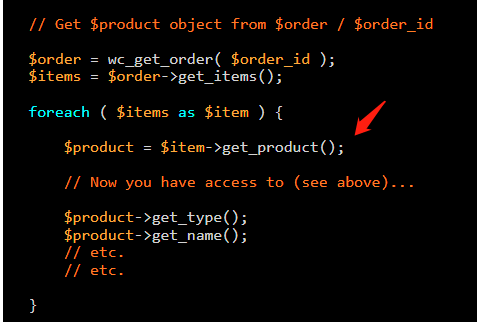
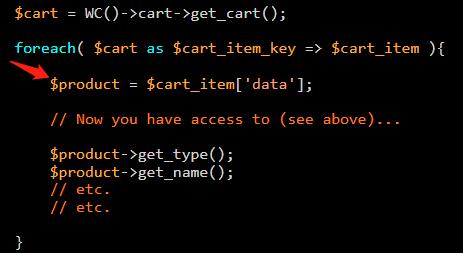
新品推荐(featured product)调用
推荐其实是一种分类方式。发布产品时勾选 "This is a featured product"。
$myQuery = new WP_Query([
    'post_type'      => 'product',
    'posts_per_page' => -1,
    'tax_query'      => [
        'relation' => 'AND',
        [
            'taxonomy' => 'product_visibility',
            'field'    => 'slug',
            'terms'    => ['exclude-from-catalog', 'outofstock'],
            'operator' => 'NOT IN',
        ],
        [
            'taxonomy' => 'product_visibility',
            'field'    => 'slug',
            'terms'    => 'featured',
        ],
    ],
]);
if ($myQuery->have_posts()) {
    while ($myQuery->the_post()) {
        global $product;
        echo the_permalink();
        echo wc_price(wc_get_price_to_display($product, ['price' => $product->get_price(), 'qty' => 1]));
        echo the_post_thumbnail_url('shop_catalog');
    }
}
wp_reset_postdata();
§32 核心对象:$order / $cart / WP_Query / $wpdb
先给结论:四个对象各管一段生命周期。 订单、购物车、查询、直连库——按需取用。
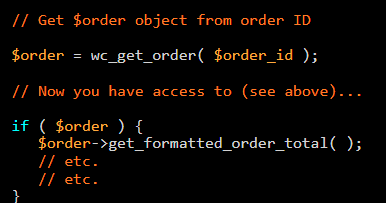
$order 对象 订单相关数据都在里面:总额、条目、客户等。 参考:https://www.businessbloomer.com/woocommerce-easily-get-order-info-total-items-etc-from-order-object/
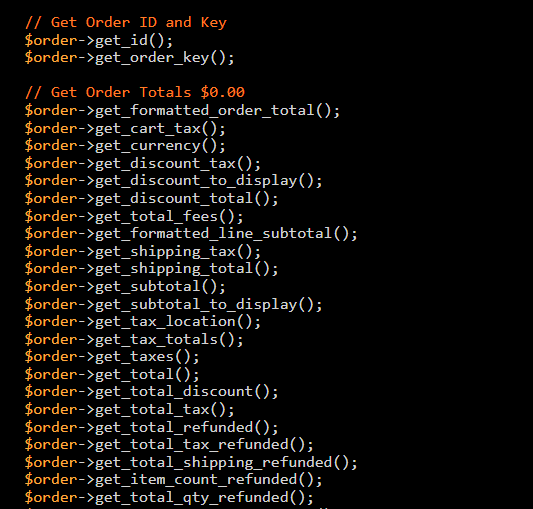
$cart 对象 购物车里的商品、数量、总价。 参考:https://www.businessbloomer.com/woocommerce-get-cart-info-total-items-etc-from-cart-object/
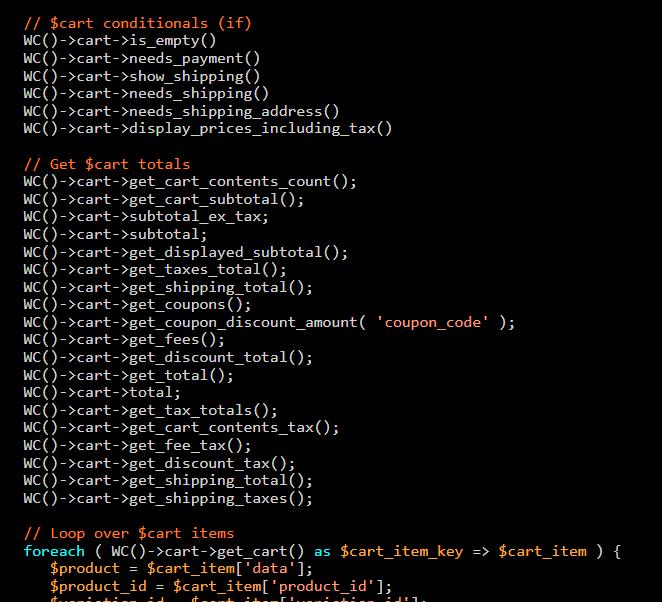
获取购物车数量:WC()->cart->get_cart_contents_count();
WP_Query 自定义调用
要么在指定标签、要么在指定分类(OR 关系):
$myQuery = new WP_Query(array(
    'post_type'      => 'product',
    'posts_per_page' => -1,
    'tax_query'      => array(
        'relation' => 'AND',
        [
            'taxonomy' => 'product_visibility',
            'field'    => 'slug',
            'terms'    => ['exclude-from-catalog', 'outofstock'],
            'operator' => 'NOT IN',
        ],
        [
            'relation' => 'OR',
            [
                'taxonomy' => 'product_cat',
                'field'    => 'slug',
                'terms'    => 'clothing-1',
            ],
            [
                'taxonomy' => 'product_cat',
                'field'    => 'slug',
                'terms'    => 'beauty',
            ],
        ],
    ),
));
获取所有推荐产品:
$myQuery = new WP_Query([
    'post_type'      => 'product',
    'posts_per_page' => -1,
    'tax_query'      => [
        'relation' => 'AND',
        [
            'taxonomy' => 'product_visibility',
            'field'    => 'slug',
            'terms'    => ['exclude-from-catalog', 'outofstock'],
            'operator' => 'NOT IN',
        ],
        [
            'taxonomy' => 'product_visibility',
            'field'    => 'slug',
            'terms'    => 'featured',
            'operator' => 'IN',
        ],
    ],
]);
$wpdb 对象 直连数据库,做报表、批量改数时很有用。
// 执行 SQL 查询,返回对象数组
$results = $wpdb->get_results(
    "SELECT * FROM {$wpdb->prefix}options WHERE option_id = 1",
    OBJECT
);
// 获取单个变量
$user_count = $wpdb->get_var("SELECT COUNT(*) FROM {$wpdb->users}");
// 获取一行
$mylink = $wpdb->get_row("SELECT * FROM {$wpdb->links} WHERE link_id = 10");
// 获取结果集
$result = $wpdb->get_results("SELECT * FROM {$wpdb->posts} WHERE post_status = 'publish'");
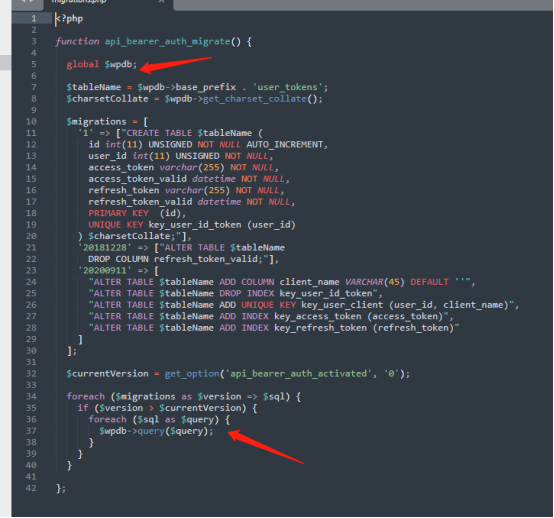
标叔的经验:能用 WC 函数就别直接写 SQL。 除非你要做 WP 没有的聚合统计。直连库风险高,改错一行全站崩。
向前桥接:对象和 API 都会用了。 Part 4 进实战——把商店前端改成你想要的样。